
What's New in Toolpath: October 2025
Hey Toolpathers! October is here, and we've released some big updates. Check out all the exciting features that are new in Toolpath.
In this update:
- Change Feature and Set Up Order
- Cut Configs Revamp
- Experimental Mode
- App Tour Walk Through
- Live Chat with the Team
- Success Story: Subtract
- Success Story: Neff Machine
Define Feature and Set Up Order
Many of you have been asking for a long time if you can just drag around the order of the set ups in Toolpath when it doesn't program it the way you want it to. Well, now you can do just that. Check out the video below to see our very own Head of Product, Pete, walk through how this all works.
Cut Configs Just Got Easier!
We have redefined how cut configs work. Now it's more intuitive than ever. Upload your tool library, auto-generate presets, and then tell Toolpath what tools are allowed to be used for each role. You can even star your favorite cutting roles for each tool because we all know you have that favorite rougher 😉.
Experimental Mode: toolpaths in Toolpath!
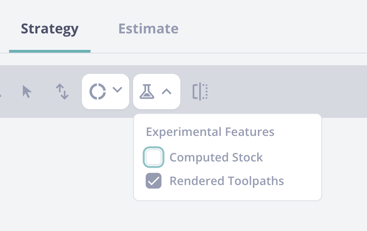
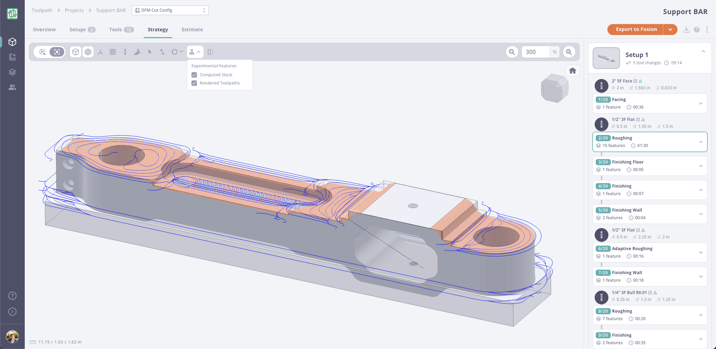
Try new features that the team is working on by quickly toggling them on and off in the Tool Bar. The toolpaths shown in Experimental Mode are early-stage and currently hidden by default while we improve their quality, links, and reliability. These previews are powered by our partnership with ModuleWorks, and while they demonstrate what's coming, they don't yet match the toolpaths generated inside Fusion. When you export to Fusion today, Toolpath recreates operations using native Fusion toolpaths for full accuracy and control.
Visualize rendered toolpaths and stock using the experimental features:
App Tour Walk Through
Forget how to use Toolpath? No worries — we have a fully guided tour that you can turn on anytime. Just click the "?" icon in the top right corner to start the tour.
.png?width=940&height=574&name=Group%20109%20(1).png)
Live Chat with the Team — NOT Bots
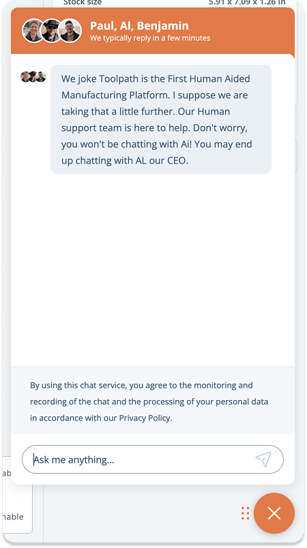
At Toolpath, we believe automation should never replace human connection. It should make room for it. Our goal is to automate the repetitive and the mundane so people can focus on the work that truly matters — creating, solving, and connecting.
Need help or have a quick question? We got you. Use the chat icon in the bottom right corner to reach a real Toolpath employee, not a help bot. You can drag the chat icon anywhere you want by clicking on the six dots and moving it to your preferred spot.
Conversations with other humans are among the most valuable things we can do. If you want to talk to an AI about Toolpath, that is fine too — the good ones already know plenty about us. But if you want to talk about your shop, your parts, and how Toolpath can actually help you work smarter, chat with us. That is why we are here.

Success Story: Subtract
AJ shares how automating CAM and quoting completely changed his workflow, cutting quoting time from hours to just minutes and allowing his team to handle jobs for eight shops at once. From running Audacity Micro, his own precision job shop focused on micro-scale components, to leading a growing network of machine shops through Subtract Manufacturing, AJ explains how Toolpath became the "time multiplier" that helped him compete at a whole new level.
Success Story: Neff Machine
Ty Neff, owner of Neff Machine, serves a variety of industries. With Toolpath, he can spot DFM issues in seconds and cut quoting time from hours to minutes, keeping machines running and projects moving. From custom aluminum keyboard chassis to one-off prototypes, Toolpath helps Ty spend less time behind a desk and more time making parts.
.png?width=224&height=195&name=Group%20111%20(1).png)
Toolpath is evolving fast, with new features and improvements rolling out every week. To make sure everyone who has already tried Toolpath can see how far it has come, we are giving all past trial users ongoing, limited access to the platform. This is not a one-time reopening — it is a standing invitation to explore the latest updates, see what is new, and experience Toolpath's continuous growth firsthand. Jump back into your account and play around with all the new features waiting for you.